Highlights
The whole edge works
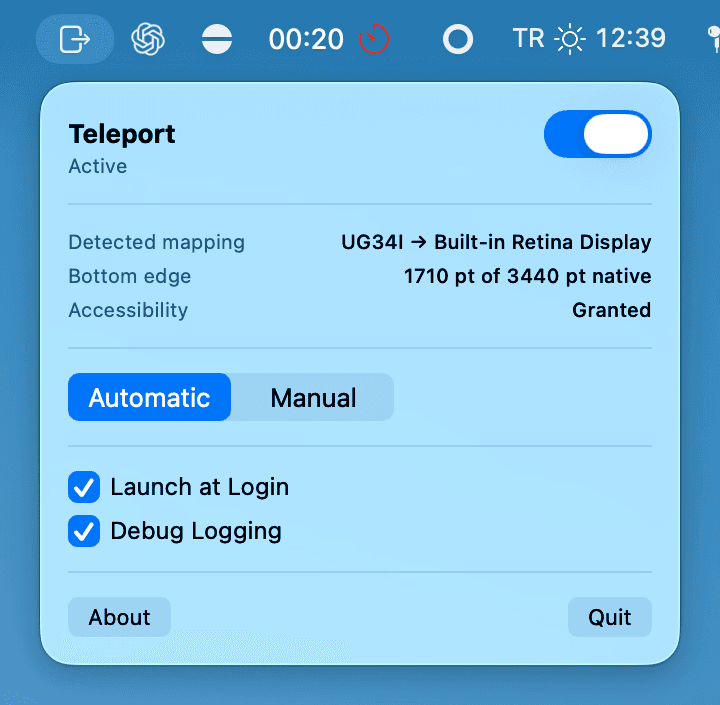
A cursor leaving the far left or far right of the top display is mapped proportionally onto the bottom one.
Upward stays native
Teleport is not a bidirectional portal; it never intercepts upward movement. Toggling it off restores stock macOS instantly.
Automatic display detection
Resolutions, scaling and display IDs are read at runtime and recalculated on every change: connect, rearrange, sleep and wake. No restart, ever.
Manual pairing
With three or more displays, pick the source (top) and destination (bottom) yourself.
Zero dependencies
Around 1,500 lines of Swift, tests aside. Small enough that checking it yourself is realistic.
Launch at login
No Dock icon, no window; the whole interface lives in a single menu bar panel.
Privacy
- No data collection, no tracking, no analytics. No network access: networking code is not disabled, it is absent.
- The binary links no networking framework; no account, telemetry, update check or third-party SDK.
- It does not read keystrokes; the event tap listens to mouse movement only and Input Monitoring is never requested.
- The only thing stored is your own preferences: on/off state, pairing mode and display selection.
Requirements
Getting started
- 1Download Teleport.app from GitHub Releases and move it to /Applications.
- 2Launch it; a menu bar icon appears.
- 3Click the icon and grant Accessibility permission.
Licence: MIT
Open source · MIT licence
More projects
All projectsAvva Mobile Sidekick
A voice-first AI development desktop app that puts a ChatGPT conversation and a Claude Code terminal side by side, one pair per project.
ChatGPT Tabs
A Chrome-style tabbed desktop client for the ChatGPT web app, on macOS and Windows.
AvvaMobile.Core.Parasut
A NuGet package for using the Paraşüt accounting Web API from .NET applications.